
Retail, Wholesale & Billing · by MAHTECH SOLUTIONS
Counter billing, barcodes, wholesale and GST — in one store system.
INVENTRA Retail is retail store software for counter billing, barcodes and labels, inventory, purchases, wholesale and GST — available in Standard and Premium (with manufacturing) editions.
Overview
What is INVENTRA Retail?
INVENTRA Retail is a retail store and billing management solution developed by MAHTECH SOLUTIONS. It handles the daily work of a shop — billing at the counter, scanning and printing barcodes, receiving stock from suppliers, wholesale documents, accounts and GST returns.
It runs on the store’s own computer or local network, with its data in a private PostgreSQL database. Stores that need access from anywhere can also run it on their own online server and use it from a browser, the desktop app or an installable phone / tablet app.
INVENTRA Retail comes in two editions. Standard covers retail counter billing and wholesale. Premium adds manufacturing — recipes, production orders, job work and planning — for businesses that make or repack what they sell.
Our biggest time-saver
Snap the supplier bill. INVENTRA enters it for you.
Typing a purchase bill line by line — every size, colour, rate and MRP — is the slowest, most boring job in a shop. With INVENTRA you photograph the bill and simply check it. Up to 90% less time on purchase entry.
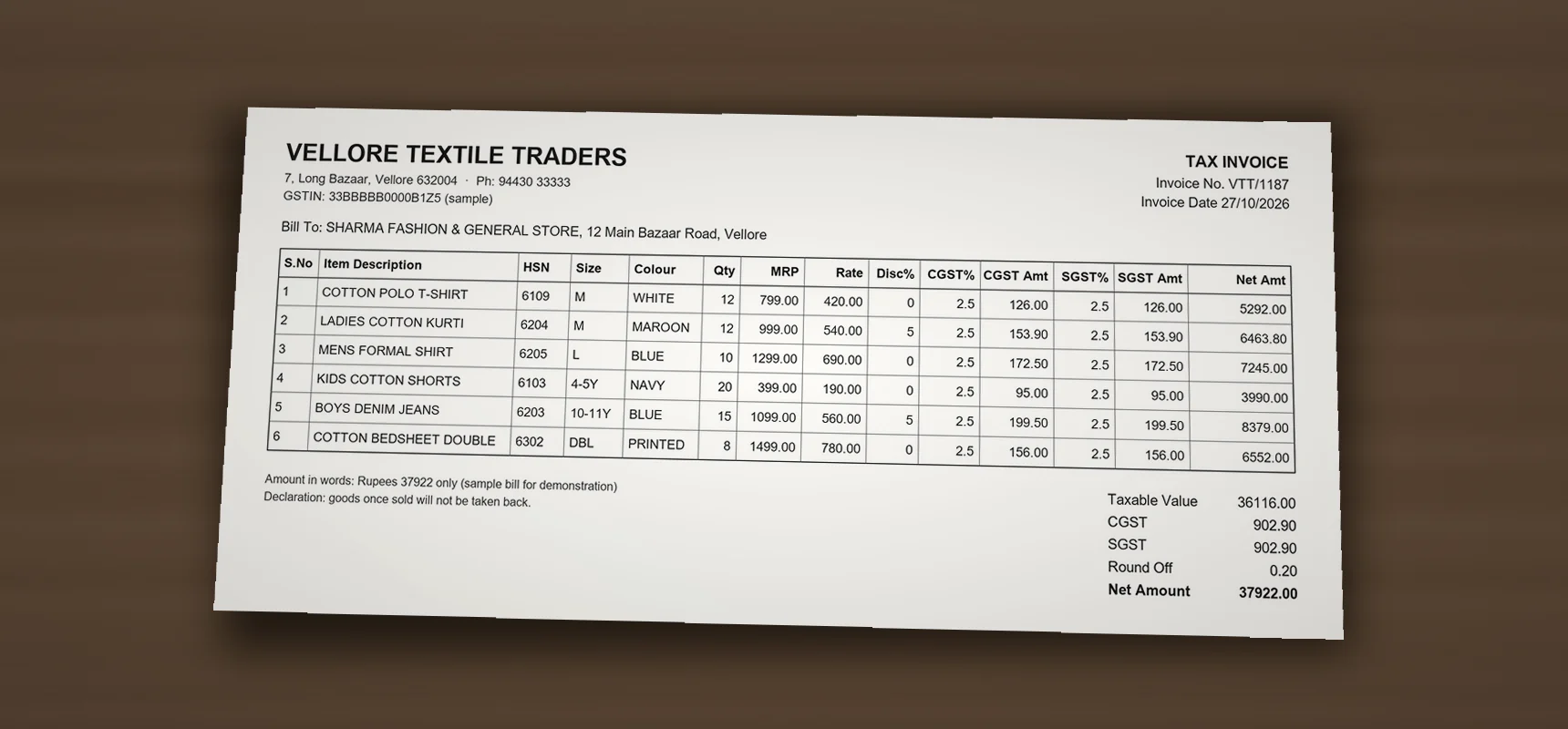 Reading the bill · no internet
- 01
Take a photo of the bill
Use your phone, or open the supplier’s PDF. Every page of one bill, in one go.
- 02
INVENTRA reads every line
Product, size, colour, quantity, rate, MRP and GST — read on your own computer. No internet needed, and the bill never leaves your shop.
- 03
Check and save
Lines are matched to your stock. Anything unsure is shown in yellow for you to confirm. Nothing reaches stock until you press save.
Key capabilities
What it covers
The core areas INVENTRA Retail is built to handle.
- 01
Supplier bill from a photo
Take a photo of the supplier bill on your phone, or open its PDF. Products, sizes, colours, quantities, rates and GST are read on your own computer and matched to your stock — you check and save. Up to 90% less time on purchase entry.
- 02
POS / Counter billing
Fast counter billing with barcode scanning, multiple payment modes, and thermal or A4/A5 bill printing.
- 03
Barcodes & labels
Generate, print and scan barcodes (EAN-13, Code 128 and more) on thermal rolls or A4 sticker sheets.
- 04
Inventory & stock
Products with brand, size, colour and variant; stock moves, stock take and optional expiry tracking.
- 05
Purchases & GRN
Supplier bills, purchase orders and goods received notes linked directly to stock.
- 06
Wholesale
Quotations, sales orders, delivery challans, tax invoices and money received from dealers.
- 07
Accounts
Supplier payments, expenses, cash and bank books, and profit & loss.
- 08
GST & Tally
GST on counter bills, GSTR-1 and GSTR-3B reports, Tally export and an auditor pack for your accountant.
- 09
Users & audit
Role-based permissions for owner, manager and cashier, with an audit log of changes.
- 10
Manufacturing (Premium)
Recipes (bill of materials), production orders, piece work, job work with ITC-04, repacking and planning.
Editions
Choose your INVENTRA Retail edition
Both editions are the same installation. Start with one and upgrade later without reinstalling or losing data.
-
INVENTRA Retail Standard
Retail counter & wholesale
- POS / counter billing
- Barcodes & label printing
- Inventory, purchases & GRN
- Wholesale documents
- Accounts, GST & Tally export
- Users, permissions & audit log
- Backup & restore
-
INVENTRA Retail Premium
Everything in Standard, plus manufacturing
- Everything in Standard
- Recipes / bill of materials
- Production orders & planning
- Piece work
- Job work with ITC-04
- Repacking & take apart
- Production registers in the auditor pack
Use cases
Who it’s for
- 01
Retail shops & supermarkets
Fashion, footwear, general stores and supermarkets that bill at the counter and manage stock by barcode.
- 02
Retail + wholesale businesses
Businesses that sell over the counter and also supply dealers with quotations, challans and tax invoices.
- 03
Small manufacturers (Premium)
Businesses that make, repack or job-work what they sell and need production linked to stock and accounts.
Deployment context
Offline on your system, or online
Deployment
- Installed on the store’s Windows computer and works without internet; several counters can share it over the local network.
- Optionally hosted on your own online server and used from a browser, the online desktop app or an installable phone / tablet app.
- The database and business records stay with the store, and the business data you enter belongs to you.
- Built-in backup with validate and restore. We recommend keeping a copy away from the main computer.
- Licensing is arranged per store — for example annual or lifetime — as agreed in the licence agreement.
Technology & support
- PostgreSQL database, installed as part of the deployment.
- Support can include installation and configuration assistance, bug fixing, database troubleshooting, application-related technical support and approved updates.
- Upgrading from Standard to Premium is done with a Premium key on the same installation — nothing is reinstalled and no data is lost.
Product video
See INVENTRA Retail in action
A short tour of INVENTRA Retail using real screens — in English, Hindi or Tamil. For a walkthrough with your own workflow, request a live demo.
INVENTRA Retail · English
Live walkthrough
Want to see it with your own products?
The best way to evaluate INVENTRA Retail is a live walkthrough, where we show the software and discuss how it fits your workflow.
FAQ
Frequently asked questions
Have a question that isn’t covered here? Talk to us directly.
01 What is the difference between Standard and Premium?
Standard covers retail counter billing and wholesale. Premium includes everything in Standard and adds manufacturing — recipes, production orders, piece work, job work with ITC-04, repacking and planning.
02 Can we upgrade from Standard to Premium later?
Yes. Every store installs the same INVENTRA Retail. Premium is switched on with a Premium key issued for your store — no reinstallation and no loss of data.
03 Does it need internet?
No. The offline installation runs on your own computer or local network without internet. An online option is available for stores that want to use it from anywhere.
04 Which barcode printers are supported?
Labels can be printed on thermal label printers (203 / 300 dpi) and on A4 sticker sheets with a laser printer. Raw TSPL and ZPL output is also available for TSC, Xprinter and Zebra printers.
05 Who owns the data?
The business data you enter belongs to you. MAHTECH SOLUTIONS does not claim ownership of it.
More from MAHTECH

INVENTRA Retail
Interested in INVENTRA Retail? Let’s walk you through it.
Request a demo and we’ll show you the software and discuss how it fits the way your business works.